From basket to paid.
No detours.

The Nomad Fire checkout is one short route in the shop's own style, with a bundle deal for accessories in the cart: enter your address, pay through Mollie, done. Everything that comes after, from confirmation to invoice, Neuramerce handles in the customer's language.
Sales & inventory

Case Nomad Fire Co. · Checkout

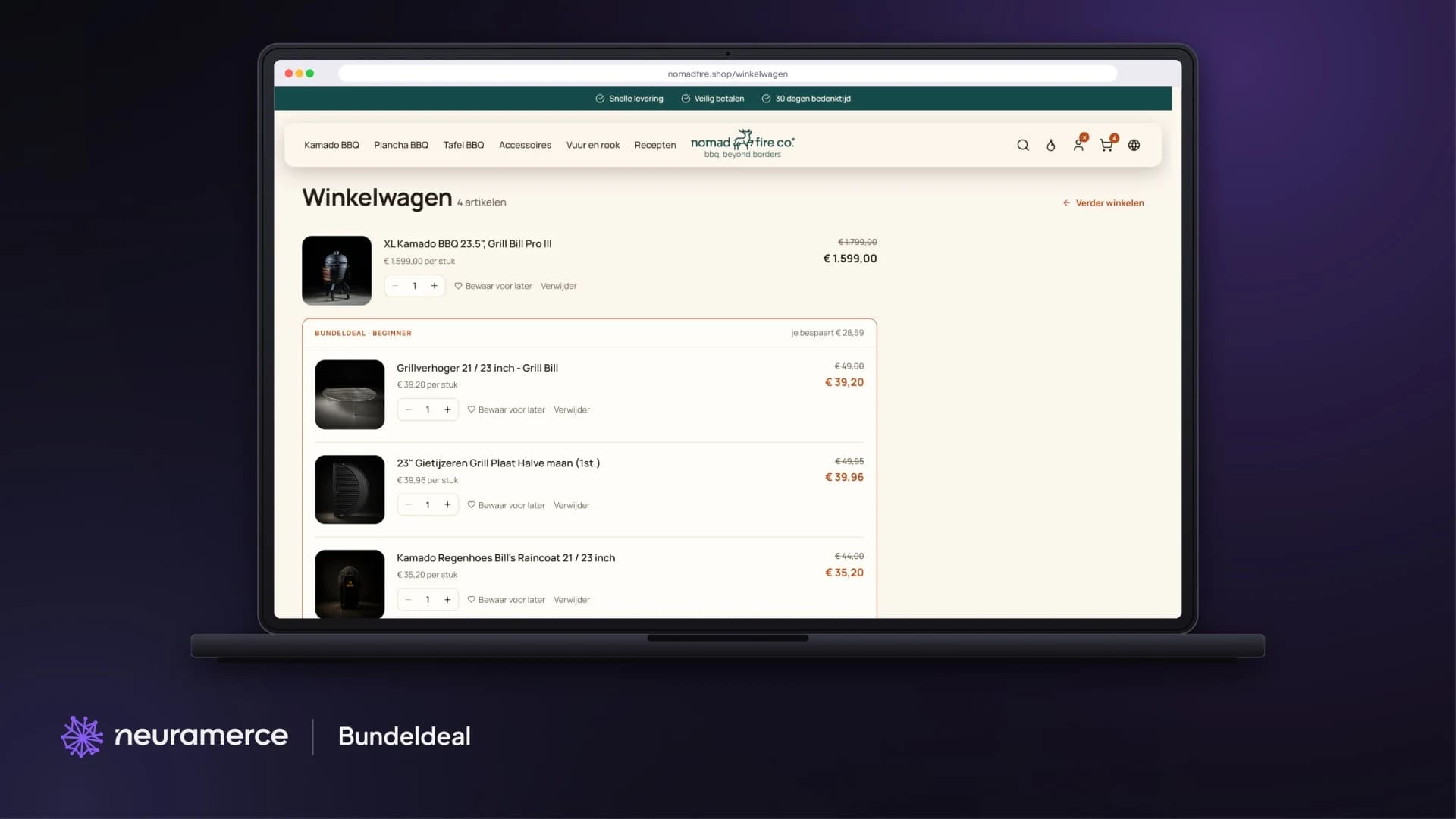
Nomad Fire shopping cart with a Grill Bill Pro III and three accessories with bundle discount
The problem

Every extra step costs orders.

Nobody buys a kamado of over a thousand euros on impulse. But once the decision is made, checking out has to be quick. A mandatory account, address fields that don't help, or a payment page in a different style: each of those is a moment where a customer drops off.

So we built a fast checkout without a mandatory account, and moved everything that can wait to the thank-you page.

Pay first. An account can come after, with one click.
How it works

Quick to check out, fully handled.

Bundle deal in the cart

Add accessories to a kamado with a 20% bundle discount. In the cart they are grouped under the main product, with what you save. Free sets are added automatically.

Just an email address first

Checkout starts with one field. No account needed, and anyone who has one gets their details filled in.

Payments through Mollie

iDEAL, cards and other methods. After payment the order is marked as paid in Neuramerce straight away.

An account in one click

On the thank-you page the customer creates an account with one click. The order is already in it.

Email in the customer's language

Order confirmation, shipping email, invoice and credit note go out in Dutch, English or German, depending on where the customer ordered.

Returns and credit notes

When a refund is made, Neuramerce creates the credit note and emails it to the customer.
In pictures

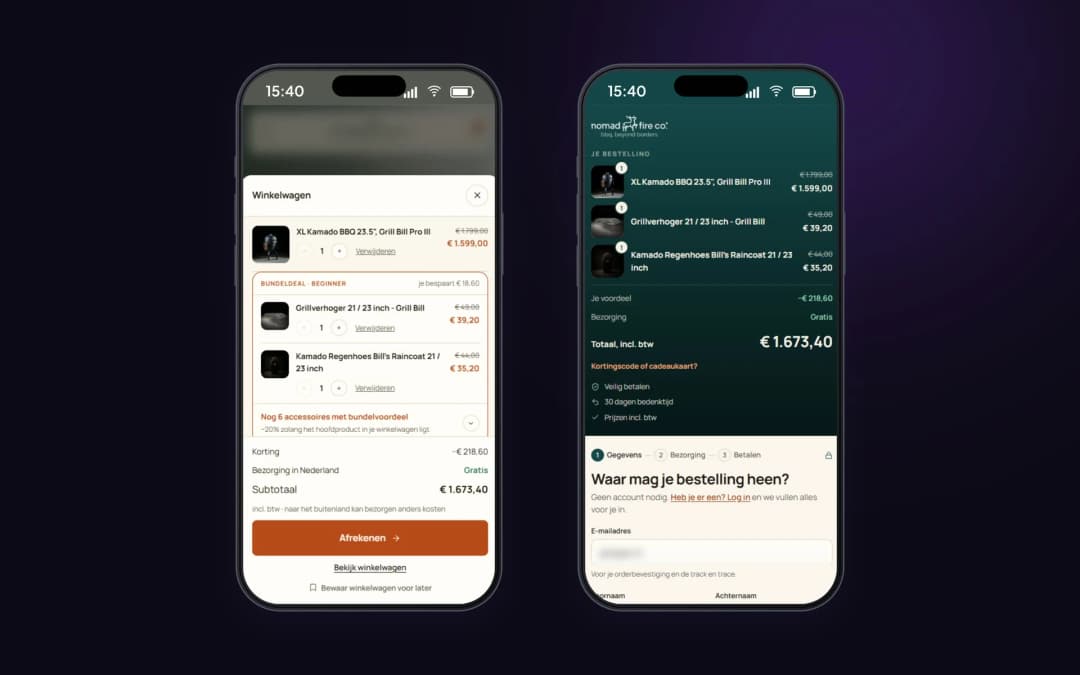
From cart to payment step on mobile.

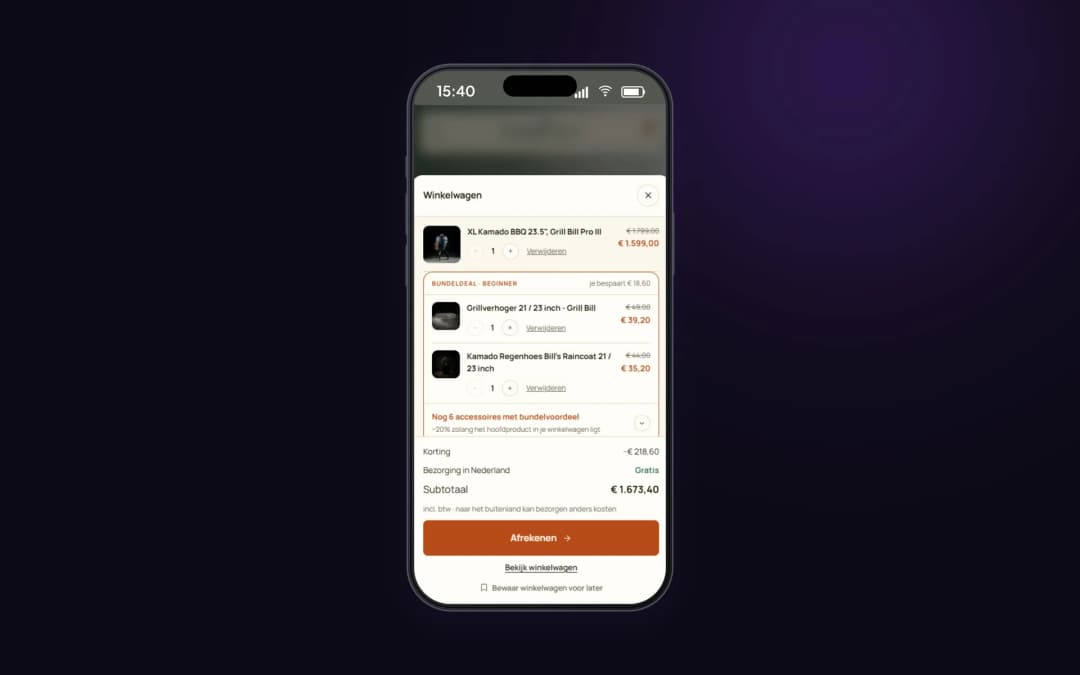
Cart as a drawer
Cart as a drawer
The bundle deal is grouped under the kamado, with what you save.
Cart and checkout
Cart and checkout
Order at the top, then three steps: details, delivery and payment. Personal details are made unreadable.
Why this way

The bundle deal only works if it stays visible in the cart.

Nobody buys a kamado bare. A grill extender, a rain cover or a cast-iron plate almost always come with it. The bundle deal gives a discount on those accessories as long as the kamado is in the cart. By grouping them under the kamado in the cart, with the amount you save, the customer sees why those lines belong together.

Checkout starts with just an email address, because that is the smallest step you can ask for. Anyone with an account then gets their details filled in. Anyone without one doesn't have to create one: that can be done after payment with one click, with the order already in it.

Mollie is connected through the shop's own Mollie account. The money goes straight to Nomad Fire, and the payment status shows up at the order in Neuramerce right away.

Ask for the smallest step first, the rest follows.

The module behind it

This checkout is part of the webshop module.

The checkout and bundle deal in this case come standard with the Neuramerce webshop module, along with search, shipping and returns.

FAQ

Frequently asked questions about checkout and the bundle deal

With a kamado you choose accessories with a bundle discount, up to 20 percent at Nomad Fire. The discount applies as long as the main product is in the cart, and the cart shows how much you save.
No. Checkout starts with just an email address. After payment the customer can create an account with one click, with the order already in it.
Through Mollie, among others iDEAL, card, PayPal and bank transfer. Payment runs through the shop's own Mollie account.
Order confirmation, shipping email, invoice and credit note go out in Dutch, English or German, depending on the language the customer ordered in.

A checkout that doesn't get in the way?

We show you the full route, from basket to invoice, on a real webshop.
View pricing