
See what your visitors do.
Not just how many there are.
See where visitors come from, where they drop off and what they do on the page. Visits, funnel, heatmaps and session recordings sit in the same analytics as your revenue and ad costs, without a separate third-party script.
Included in Starter, Pro and Complete · replaces separate heatmap and recording tools, among others
What's included
Visitors, funnel, heatmaps and recordings. In your own analytics.
Visitors and sources
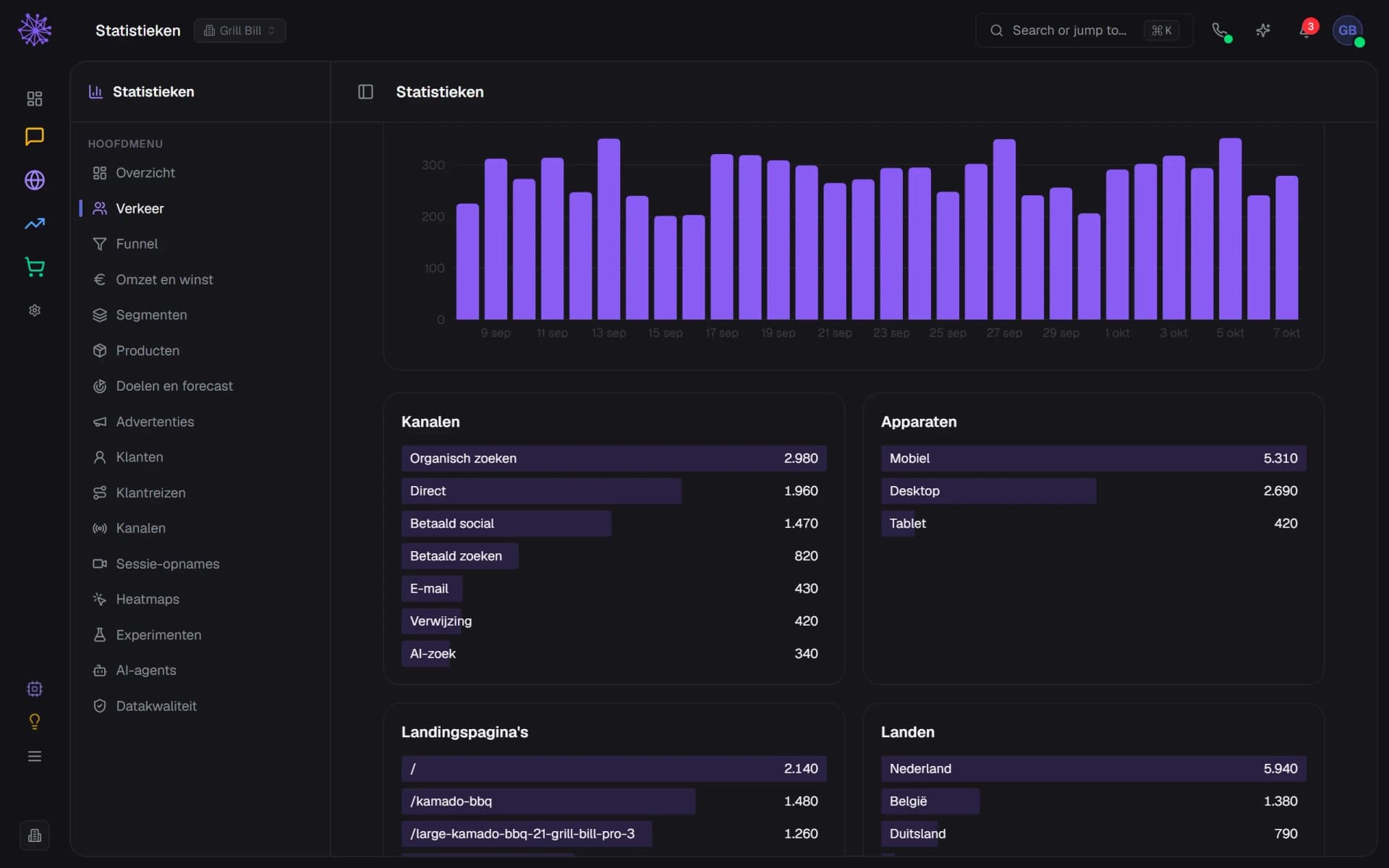
Visits per day, channel, device, landing page and country. We count this without a cookie and without waiting for the cookie notice: the IP address and browser are not stored, only a hash that changes every day. For location we store the country. Visitors arriving from ChatGPT, Perplexity or Claude show up under AI search.
- Visits per day, counted without a cookie
- AI search: visits via ChatGPT, Perplexity or Claude
- Only the country, no city or IP address
Funnel from visit to order
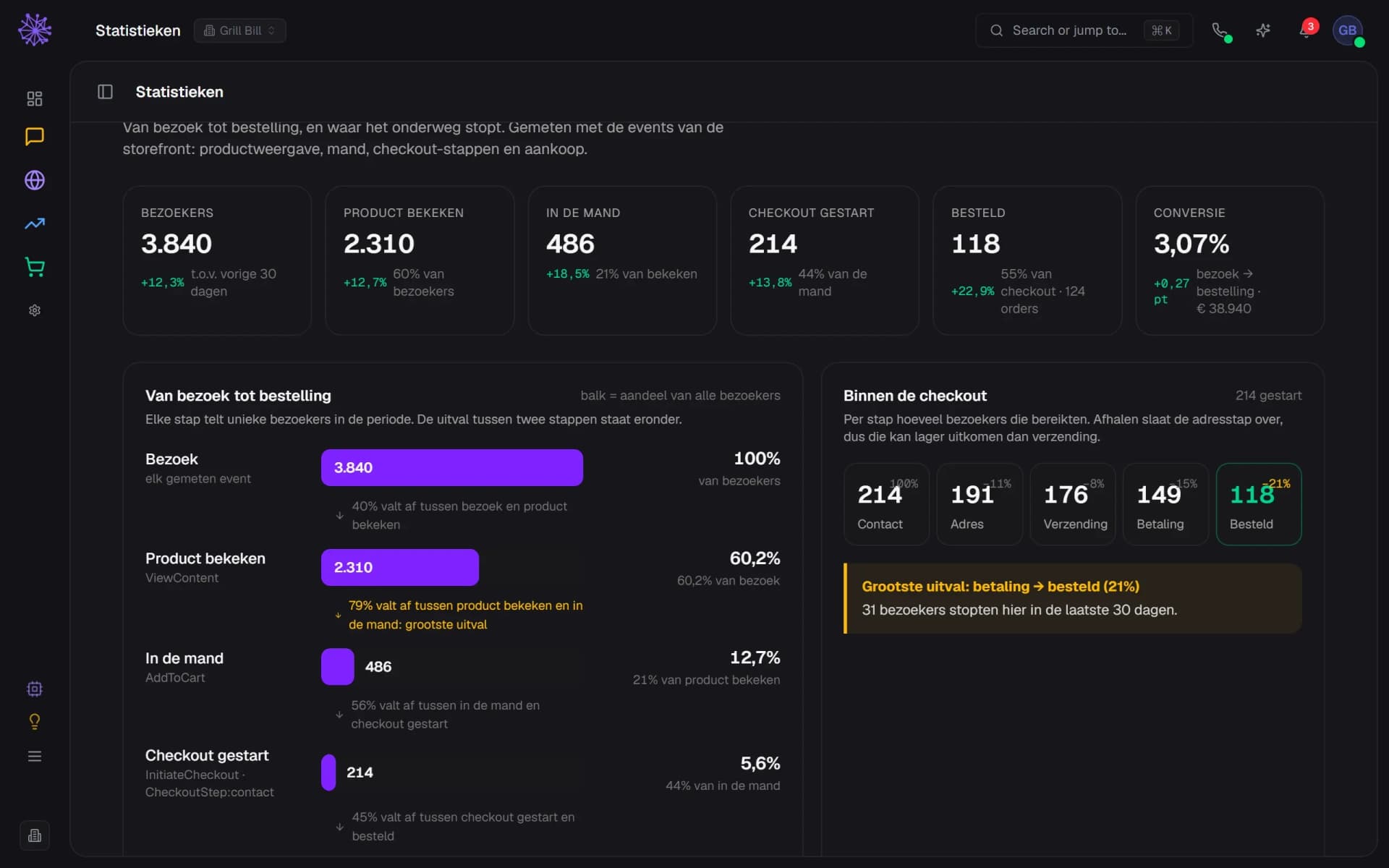
Visit, product viewed, in the cart, checkout started, ordered, with the drop-off between every step. In the checkout you see where it stops per step, and per source and campaign how each group converts. The funnel counts visitors who consented to statistics, so the numbers are lower than under Traffic.
- Conversion from visit to order
- Biggest drop-off between two steps
- Where it stops inside the checkout
A heatmap over your real page
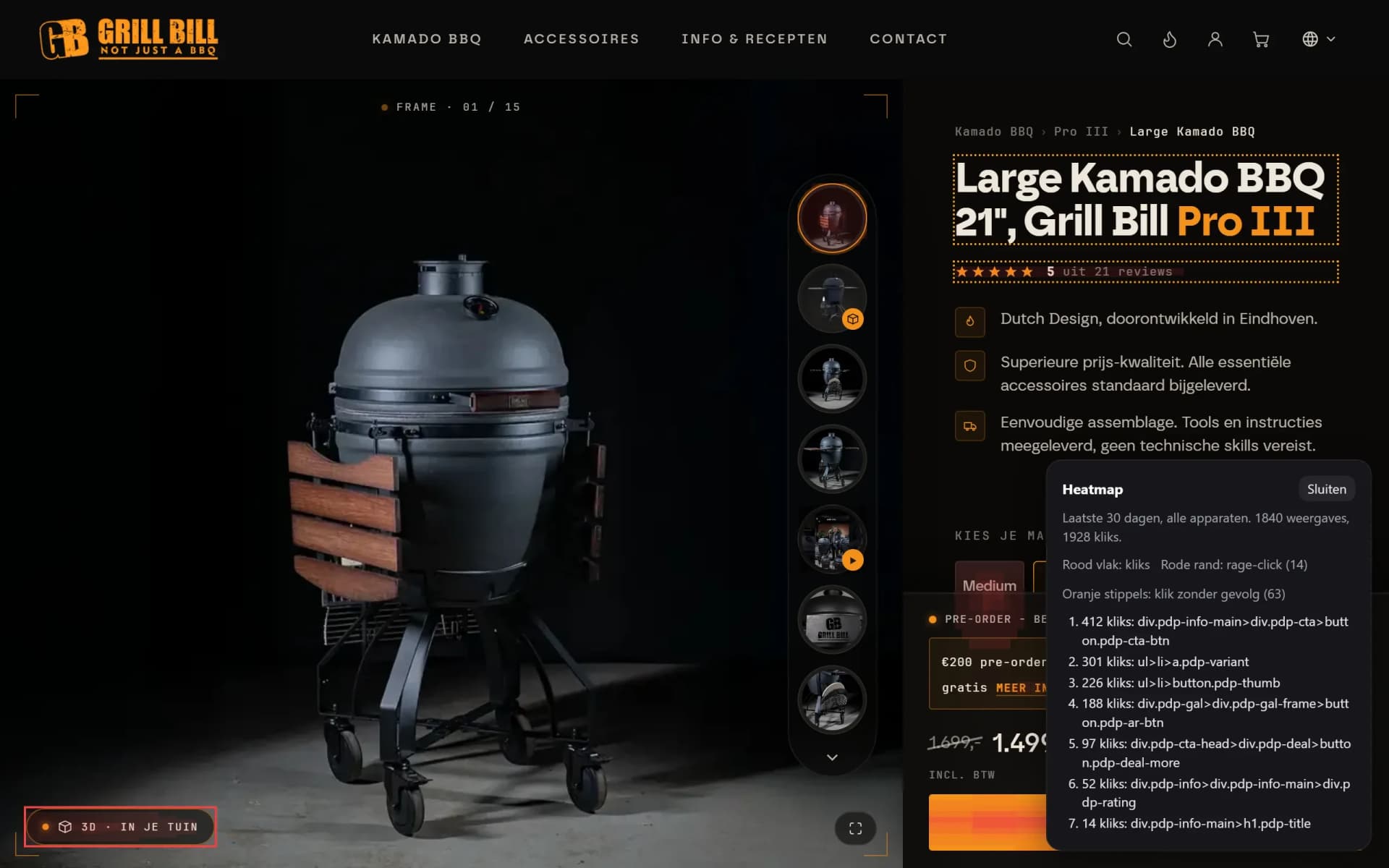
Open your shop from the dashboard and lay the heatmap over the page as visitors see it. Red areas show where an element is clicked, a red outline a rage click (three clicks within half a second) and orange dots a click with no result. Dashed lines show per 10% how many visitors scrolled that far. The link is valid for 10 minutes, for that site only.
- Red areas: where visitors click on the button
- Red outline: rage clicks on the 3D button
- Orange dots: a click that does nothing
Heatmaps in the dashboard
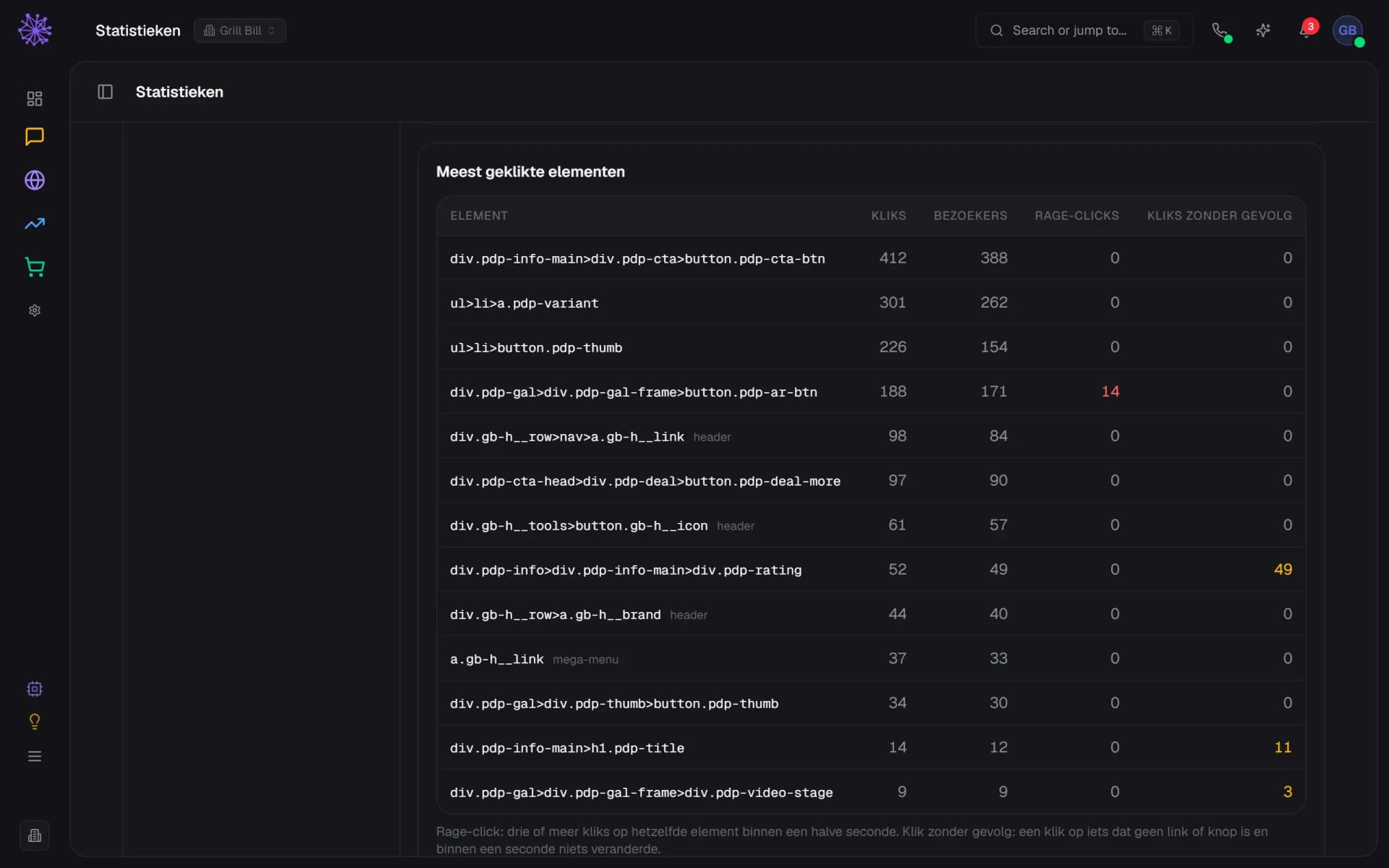
Per page template, language and device: the most clicked elements with the number of visitors, plus rage clicks and clicks with no result. JavaScript errors count as an anonymous code, without error message or page. No text, input or pixel positions are stored. Raw clicks are kept for 30 days, the totals after that.
- Most clicked element, with number of visitors
- Rage clicks: three clicks within half a second
- Clicks on something that does not respond
Session recordings
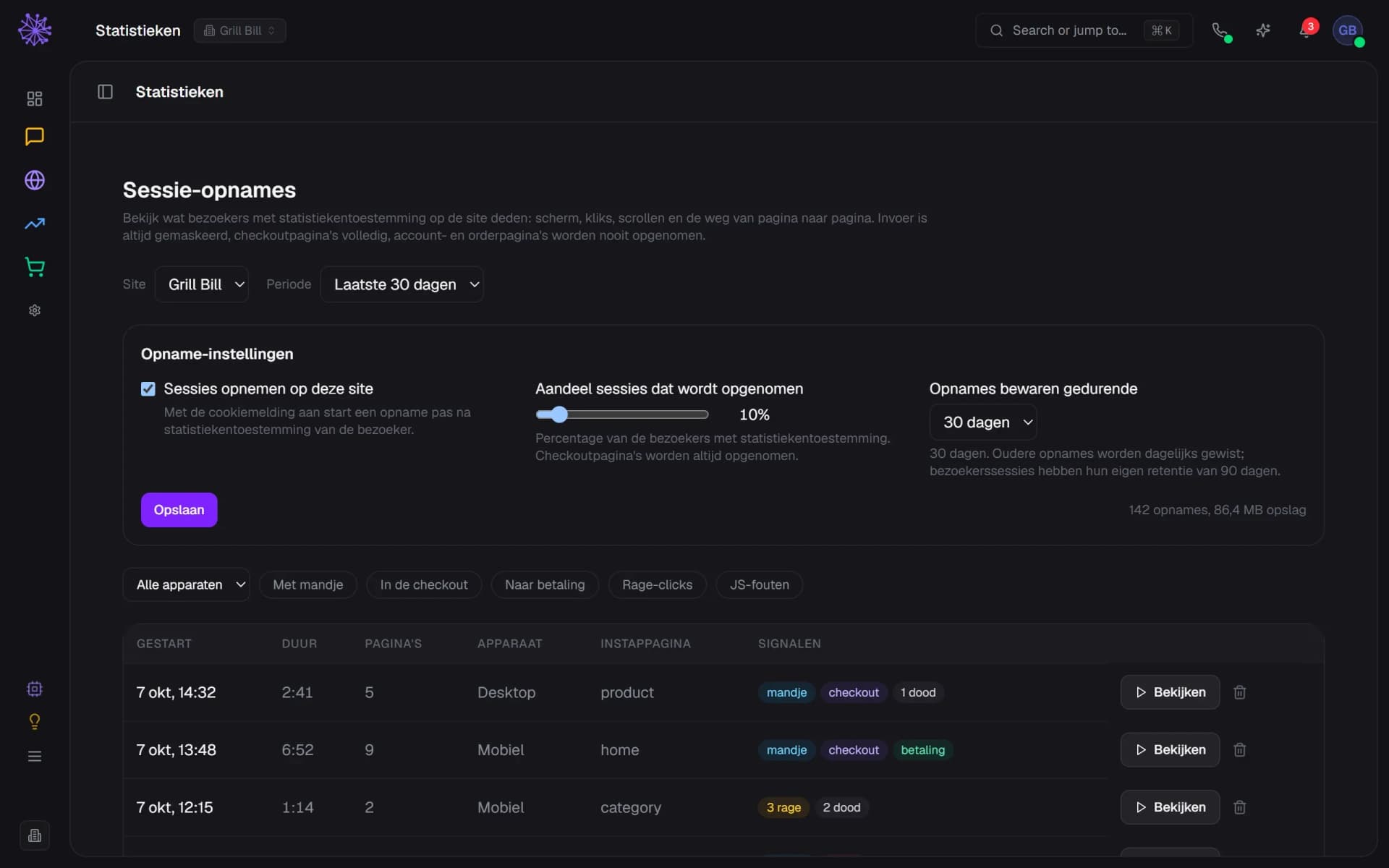
You switch recording on per site; it is off by default. You choose what share of sessions is recorded (10% by default) and how long they are kept (7 to 90 days, 30 by default). The checkout is always recorded. The list flags visits with a cart, checkout, payment, rage clicks or errors, so you do not browse at random.
- Recording is off by default, on per site
- Choose what share of sessions is recorded
- Signals: cart, checkout, payment, rage, errors
Playback with masking
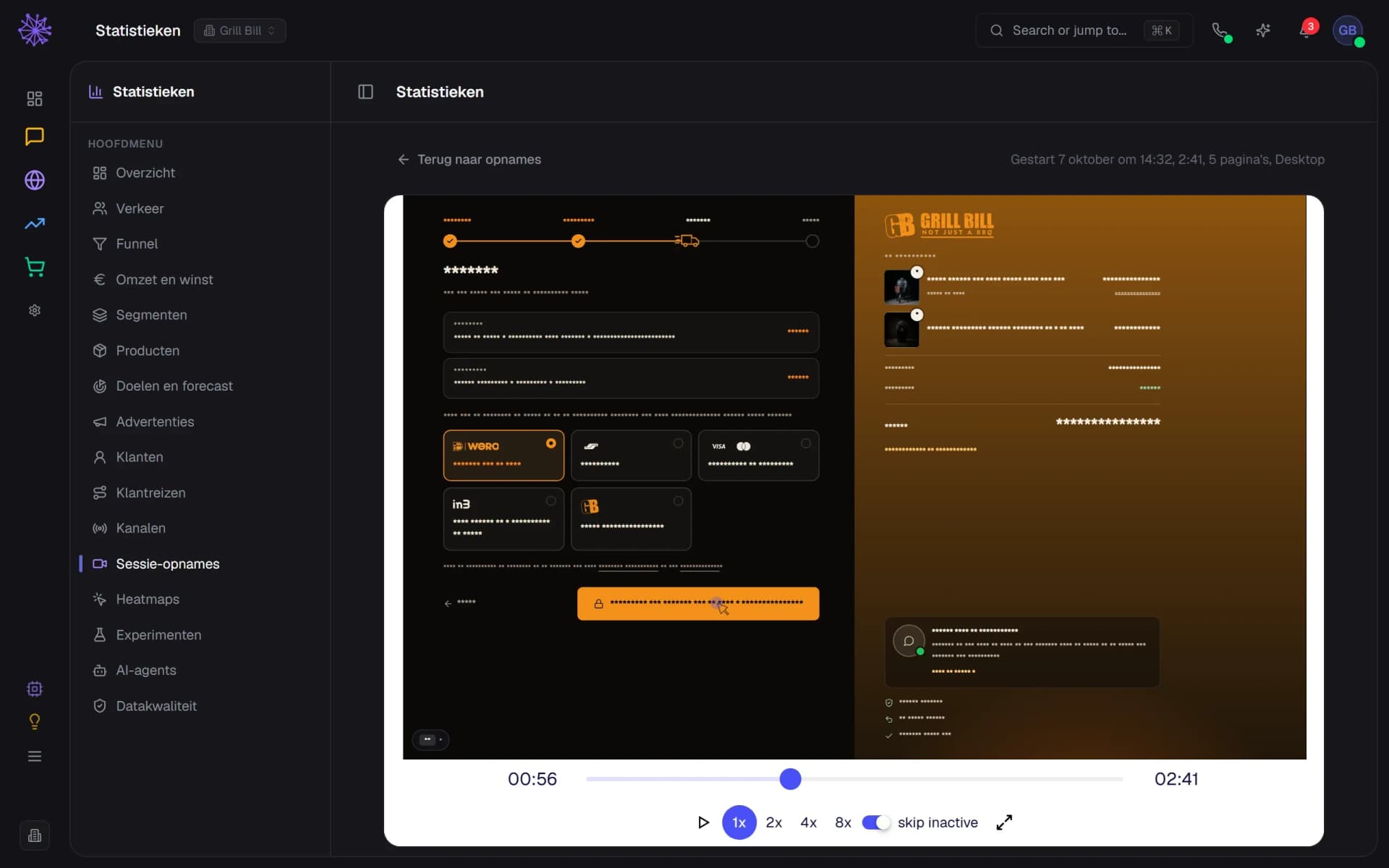
Play a visit back with mouse, scrolling and clicks, at 1x to 8x and with quiet moments skipped. All input fields are masked. On the checkout all text is an asterisk, account and order pages are never recorded and the page address is stored without parameters. Recordings are stored encrypted.
- On the checkout all text becomes an asterisk
- Behaviour and layout visible, input never
- Play at 1x to 8x, skip quiet moments
Analytics that know the rest of your platform.
Standalone analytics know nothing about your orders, ads or inbox. These sit in the same platform, so visits, orders and costs come from the same source.
- Webshop. The funnel reads the events of your own checkout: product view, cart, checkout steps and purchase. Abandoned carts and reminder emails are listed below it.
- Advertising. Ad costs per platform and campaign sit next to your revenue, with an own ROAS on the last click. Profit after ads appears once every order has a cost price.
- Website Builder. Heatmap clicks belong to the block they landed on, and under Experiments you test a different text on one block.
- Inbox and channels. The Channels tab summarises Inbox, Phone, Social Media and Email marketing, with a link to the details.
See it working in our own shops
FAQ
Frequently asked questions about website analytics.
A heatmap shows where visitors click on a page and how far they scroll. In Neuramerce you lay it over your real shop page: red areas for clicks, a red outline for rage clicks, orange dots for clicks with no result and dashed lines for scroll depth. Measurement works per page template, such as product or category, not per individual URL.
Not for heatmaps and session recordings on a Neura shop. Neuramerce hosts the recording code itself, so no third-party script is added and there is no separate subscription. Keep in mind that heatmaps work per page template, not per URL.
Under Data quality, checks run every night, among them whether the statistics match your orders, whether events still arrive and how much traffic was filtered out: bots, data centres, your own visits and views in the editor. Every key figure has an info button with its definition, source and caveat. Your own visits are excluded with the admin bar or an exclusion link; orders you place yourself do count.
We count visits without a cookie and without a stored identifier. Funnel events, heatmaps, session recordings and experiments only start after consent for statistics, when the Neuramerce cookie notice on your site is on. If that notice is off, there is no consent gate and measuring follows your settings. Whether you need consent is for you to judge: this only says what the software does.
A recording contains the pages, clicks, scrolling and mouse of one visit, with all input masked. The list shows no name, email address or IP address, and the recording itself stores no IP address or fingerprint. If the site has a chat widget, a recording can be linked to that chat session. Recordings are stored encrypted. You choose the retention from 7 to 90 days, 30 by default; older recordings are deleted daily and you can delete one yourself too.
Yes, on text. You pick one block in your shop, write a second version per language and choose what counts as success: add to cart, checkout started, paid order or a click. Neuramerce works out up front how many visitors you need and shows no interim result, so chance does not look like a winner. Only visitors who consented take part.
In two ways. Visitors who reach your site through a link in ChatGPT, Perplexity, Copilot, Gemini or Claude appear under Traffic as the AI search channel. In addition, the server counts AI agents fetching your pages, per engine, bot and purpose: training, search index or live for a user. They run no JavaScript, so they sit apart on the AI agents tab.
Analytics is included in every bundle: Starter, Pro and Complete, with no extra charge for heatmaps or recordings. The pricing page shows what else each plan includes.
Want to see what your visitors do?
In 20 minutes we'll show you the analytics on a real webshop, from visit to recording.