
Modules/Reach

A newsletter that knows your products.
Sent from your own domain.

Newsletters, automatic sequences and A/B tests in the same environment as your webshop. Products and recipes come from your catalogue, email goes out through your own domain, and a spam check runs beforehand.
See pricing

Included in every plan · campaigns, automations and spam check in one module

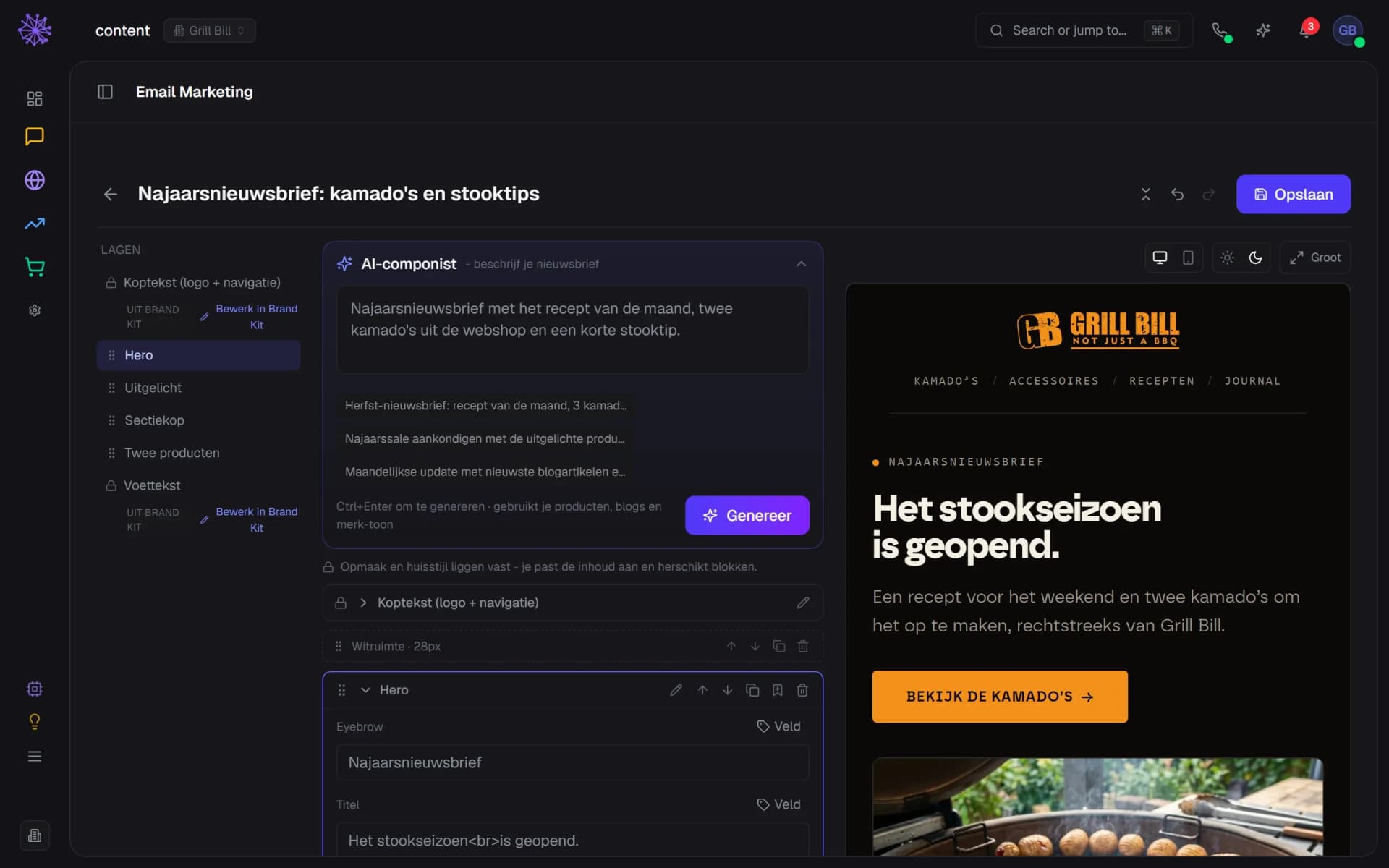
The Grill Bill email builder: AI composer, layers list and a live preview of a newsletter with a recipe and kamados.
What's included

From sending domain to revenue figure. In one module.

First, your sending domain

You add a mail subdomain, put the SPF, DKIM and DMARC records in place with your DNS provider and let the module check them. A new domain warms up: 200 emails a day in the first week, then 1,000, 5,000 and 20,000, as long as fewer than 2% bounce.
  1. A mail subdomain keeps your main domain clean
  2. SPF, DKIM and DMARC checked separately
  3. Warm-up: week 2 allows 1,000 a day
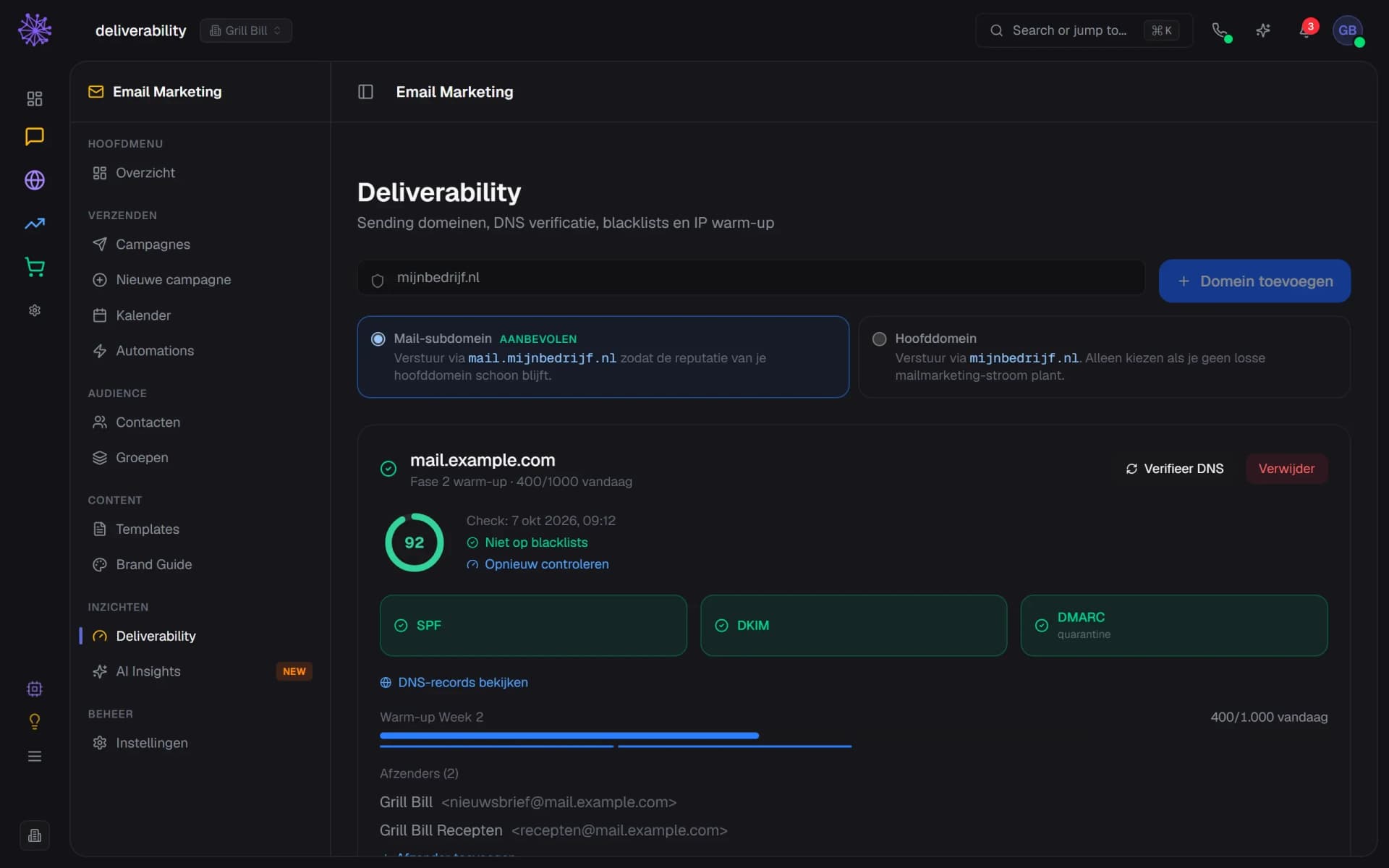
Deliverability with a verified Grill Bill mail subdomain, SPF, DKIM and DMARC status and the warm-up progress.

An email in your brand style

Pick from 13 ready-made designs, such as welcome, newsletter and recipe of the month, or let the AI composer build a newsletter from your products, recipes and blog posts. Layout and brand style are fixed, you edit the content and move blocks around. Linked products show the current price and stock in every sending round.
  1. AI writes a proposal, you choose Apply
  2. Header and footer come from your Brand Kit
  3. Preview on desktop, mobile, light and dark
The email builder with the AI composer, the layers list and a live preview of a Grill Bill newsletter in dark theme.

Who gets the email

Contact groups with double or single opt-in. With double opt-in a new subscriber confirms through an email first, and the module stores the moment of consent. Forms, popups and the newsletter block on your site fill a group, and you can paste email addresses in directly.
  1. Double opt-in is on by default
  2. Confirmed, pending and unsubscribed per group
  3. Add, move or remove members
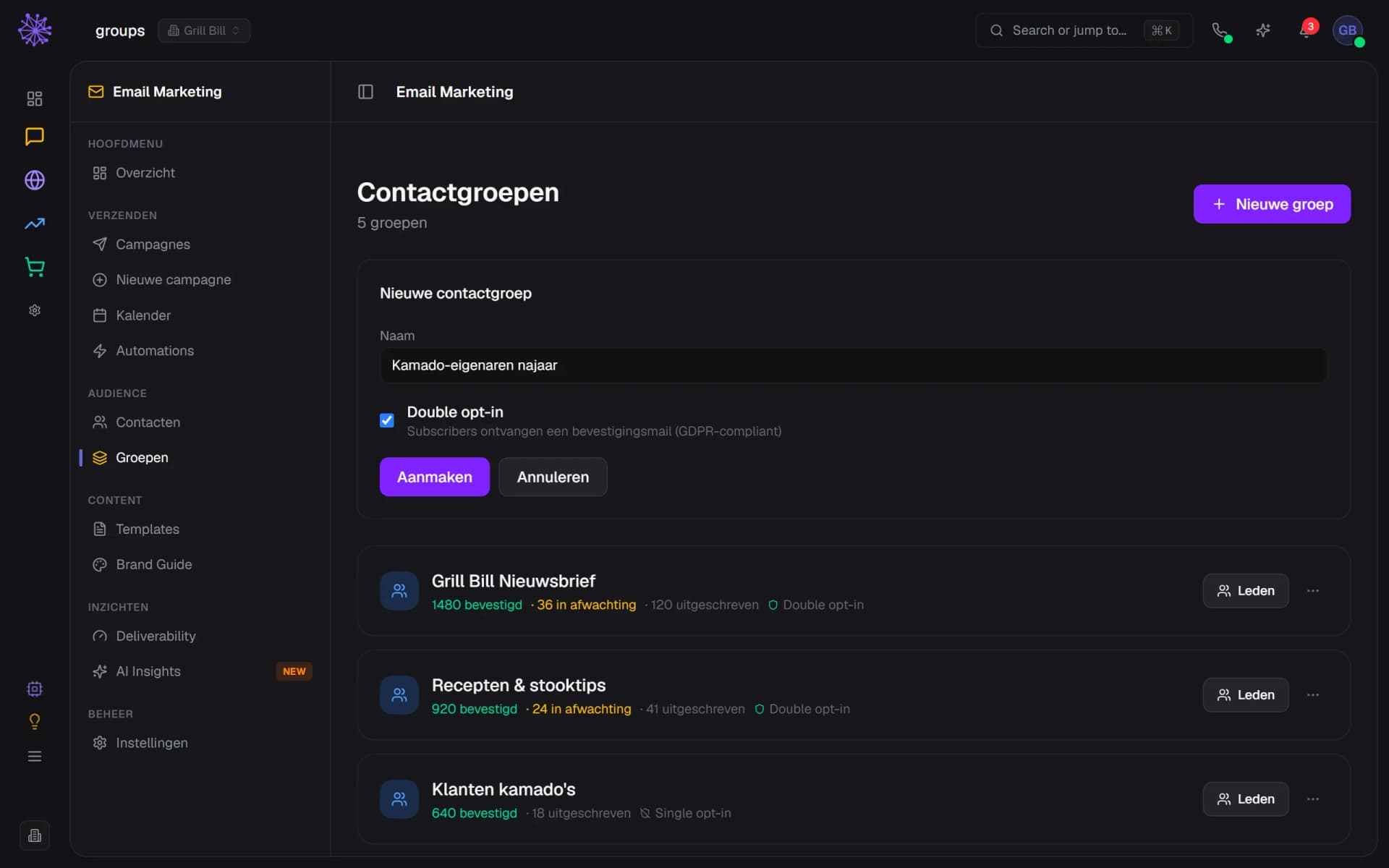
Contact groups with a new group form where double opt-in is on, and groups showing confirmed, pending and unsubscribed counts.

Only send when everything checks out

The checklist shows what is still missing: content, recipients, test email, spam check and a verified domain. A test email only goes to you and your team. An A/B test sends two subject lines to a test group, and the winner by clicks gets the rest of the list.
  1. Nothing goes out without a test email
  2. The spam check blocks above the set limit
  3. A/B: two subjects, winner decided by clicks
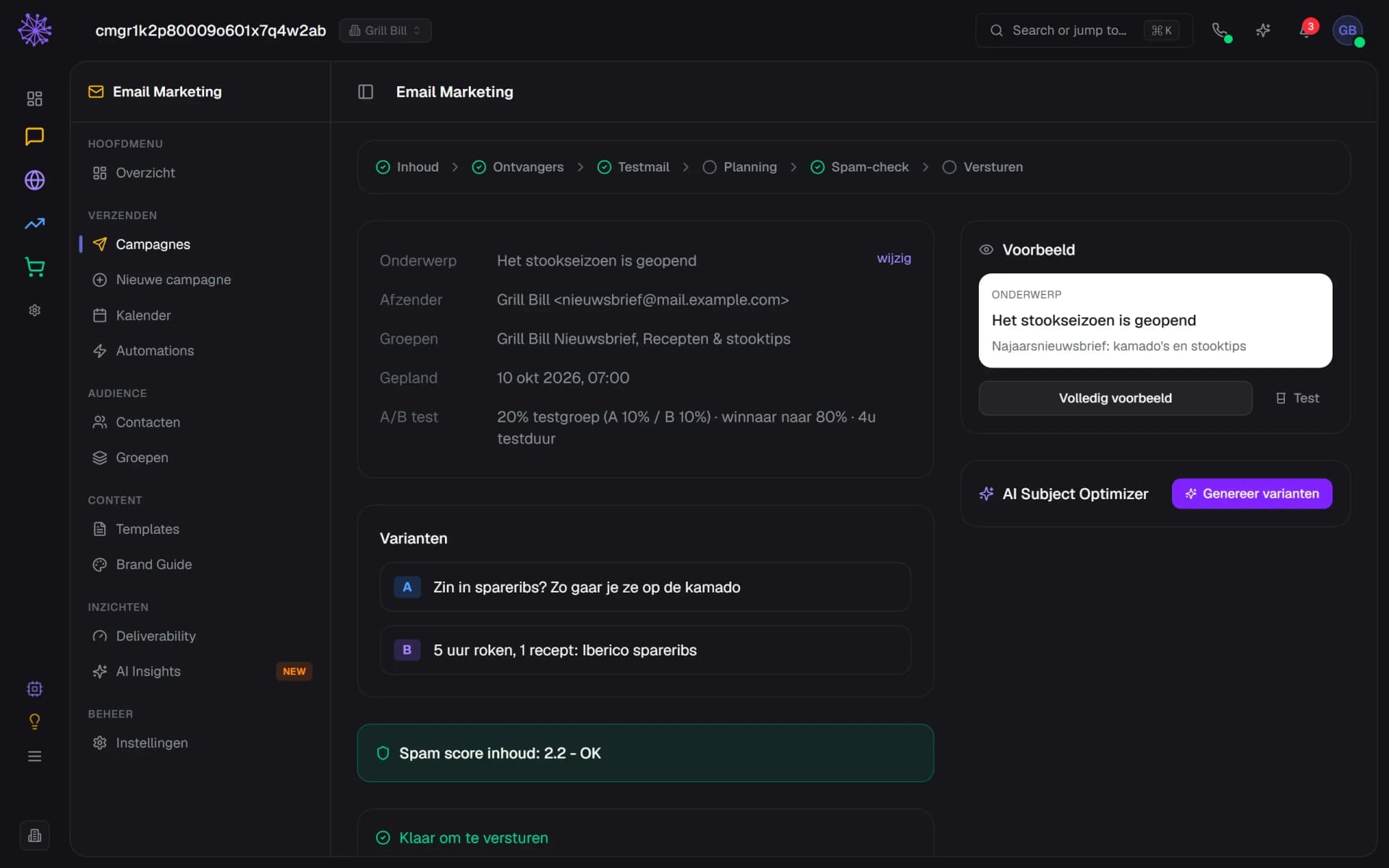
Campaign page with the ready-to-send checklist, a spam score of 2.2 and two subject variants for an A/B test.

Sequences that run by themselves

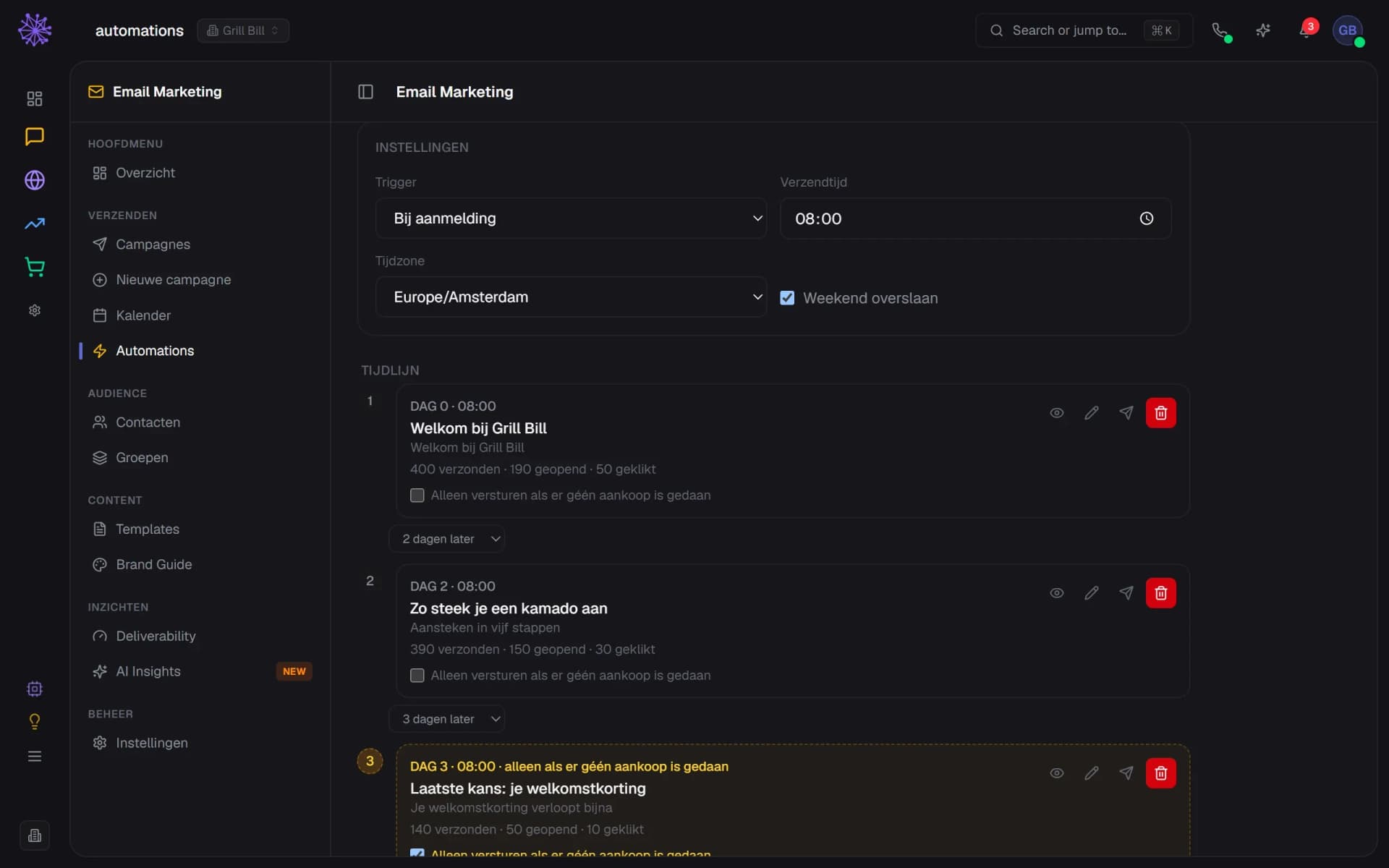
A sequence has steps with days in between, a fixed send time and optionally no weekends. It starts at a confirmed sign-up, after an order or after ninety days without a click. A last-chance email only goes out if nothing was ordered since the first email. The AI writes a sequence as a draft, you switch it on.
  1. Trigger: sign-up, order or no click
  2. Sent, opened and clicked per step
  3. Last chance only if nothing was ordered
Grill Bill welcome sequence with trigger, send time, three steps with statistics and a last-chance email.

What it brought in

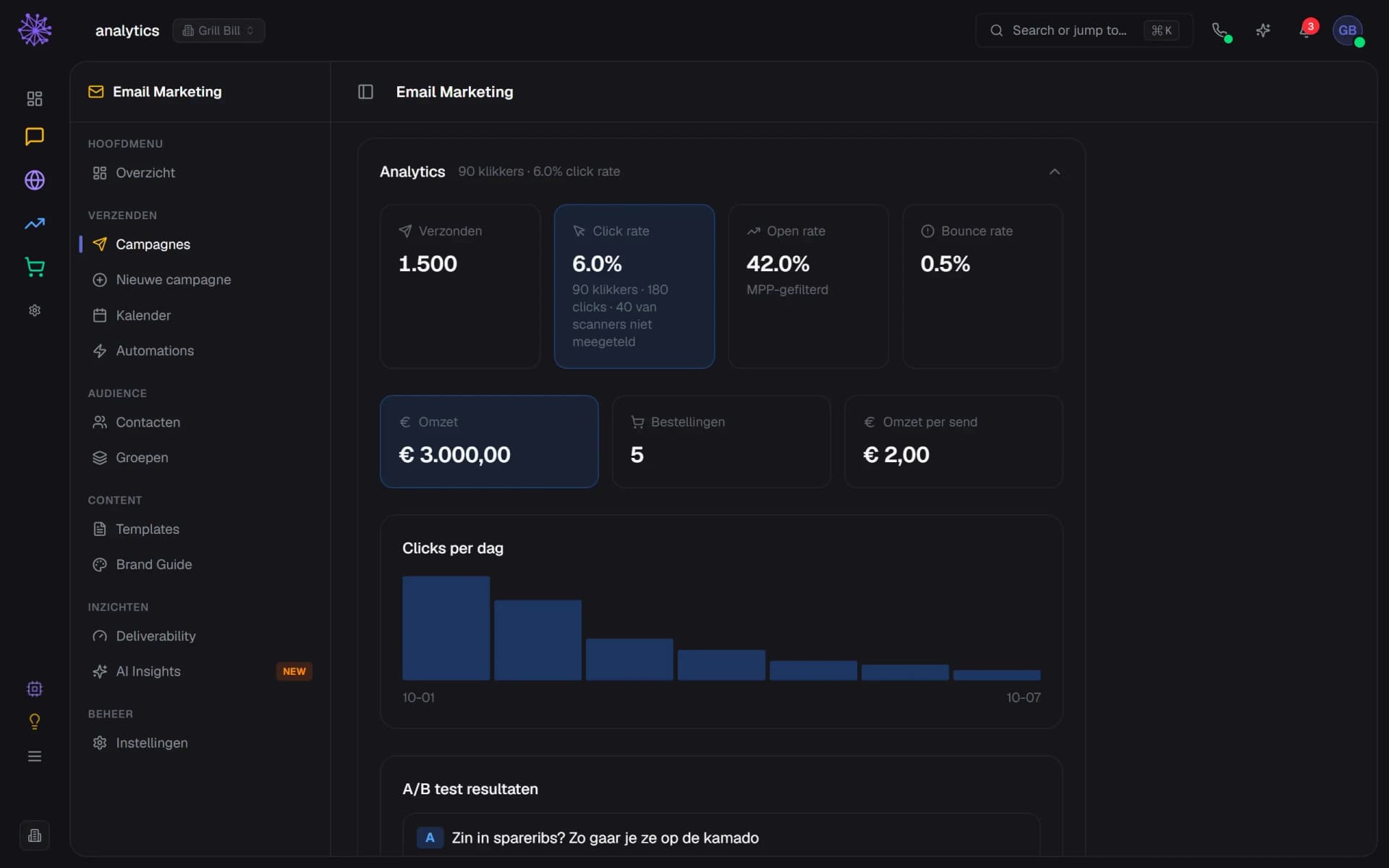
Per campaign you see opens, clicks per day and per person, bounces and the result per variant. Opens that look like they come from Apple Mail Privacy Protection and clicks from link scanners are not counted. An order within seven days of a click is added to the campaign as revenue.
  1. Clicks from link scanners are not counted
  2. Revenue: order within 7 days of a click
  3. Result per variant of your A/B test
Campaign analytics with click rate, open rate, revenue from 5 orders, clicks per day and the result of an A/B test.
app.neuramerce.com/modules/email-marketing/deliverabilityYour dashboard
Deliverability with a verified Grill Bill mail subdomain, SPF, DKIM and DMARC status and the warm-up progress.
The email builder with the AI composer, the layers list and a live preview of a Grill Bill newsletter in dark theme.
Contact groups with a new group form where double opt-in is on, and groups showing confirmed, pending and unsubscribed counts.
Campaign page with the ready-to-send checklist, a spam score of 2.2 and two subject variants for an A/B test.
Grill Bill welcome sequence with trigger, send time, three steps with statistics and a last-chance email.
Campaign analytics with click rate, open rate, revenue from 5 orders, clicks per day and the result of an A/B test.
In practice

Sent ourselves first, built second.

The screens above come from the Grill Bill newsletter, the kamado webshop that sends its mailing with this module. Every change was therefore measured on our own sends first.

That is how we saw business mail filters open every link in an email and inflate clicks, and a spam check blocking a good email because it counted missing server headers.

A mail tool that knows your webshop.

Standalone newsletter software does not know what is in stock or who ordered yesterday. This one sends from the same products, orders and forms as the rest of Neuramerce.
  • Webshop. You link product, recipe and review cards to your catalogue. Price, sale price and stock are fetched again in every sending round.
  • Orders. A sequence after an order starts at every paid order, including at the POS or through WooCommerce, and can filter on products. You see the revenue per campaign.
  • Website. Sign-up forms, popups and the newsletter block on your site subscribe people to the group you choose, with double opt-in if you want it.
  • Neura AI. Have a campaign prepared or ask for the figures. Sending is only possible after a test email and with a verified domain.
FAQ

Frequently asked questions about email marketing.

Through Neuramerce's own mail server (Postfix with Rspamd), from the sending domain you add. Each domain gets its own DKIM key, and you set the SPF, DKIM and DMARC records. Your email does not run through a resold third-party service.
The module is included in every plan: Starter, Pro and Complete. The app has no rate per email sent. The AI help, such as having a newsletter or sequence written, uses your monthly Neura credit, and the app shows what a generation cost. The pricing page lists the plans.
That depends on the warm-up of your sending domain: 200 a day in week 1, then 1,000, 5,000 and 20,000. A phase only moves up after seven days with fewer than 2% bounces. A large list therefore runs over several days, and the campaign page tells you how many. Follow-up batches also wait out the night, between 22:00 and 07:00.
Start with a verified domain (SPF, DKIM, DMARC), a mail subdomain and the warm-up. Before sending, the content goes through Rspamd, and above the set limit the campaign does not go out. Nobody can guarantee the inbox: the receiving mail provider decides that.
Yes, through CRM > Import with a CSV, TSV or JSON file. Columns are mapped automatically and anyone who had already unsubscribed stays unsubscribed. An import creates contacts, not consent: you decide which group they go into and whether that group asks for double opt-in.
Every email contains an unsubscribe link and the List-Unsubscribe header with one-click unsubscribe. A hard bounce or spam complaint sets the contact to bounced or unsubscribed, and after that it no longer receives campaigns or sequences.
Yes. You enter two subjects, choose how large the test group is (two times 10% up to two times 40% of the list) and how long the test runs (1 to 48 hours). The variant with the most clicks then goes to the rest. Testing content or sender? That is not possible, only the subject.
Better than raw counts, but never exact. Opens that look like they come from Apple Mail Privacy Protection are not counted, and clicks from link scanners (business mail filters that open every link) are recognised and left out. Treat opens as a direction and look mainly at clicks and revenue.

Want to see what your newsletter looks like?

In 20 minutes we'll show you the module with your own products as the example, from sending domain to report.
See pricing