
Modules/Website & shop/Translations

Your site in more languages.
Every language at its own address.

Turn on a language for your own website or shop, see per item what is already translated, and translate products, pages and menus with AI or by hand. Each language gets its own address and hreflang tags. This is not a translation agency: you translate the text of your own site inside Neuramerce.
See pricing

Included in every plan · for your own website and shop, not a translation agency

Translations list in the Neuramerce dashboard with products, pages and blog posts and the translation status per language, English and German
What's included

Everything to make a site multilingual.

Turn on a language

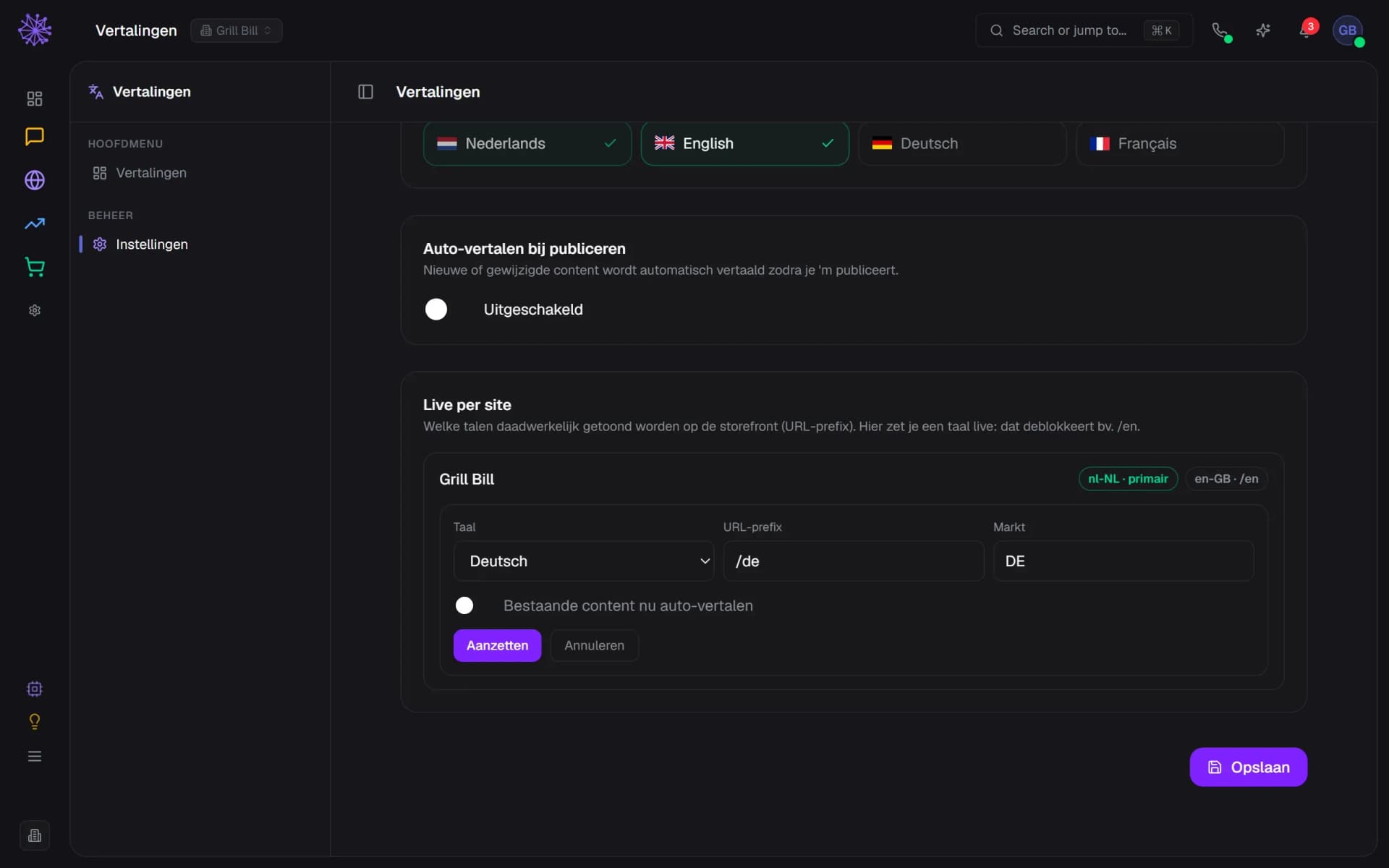
Pick a language per site, a URL prefix such as /de and a market. The market sets the shipping zone for delivery time and free delivery, and whether hreflang carries a region. Turning on a language costs nothing and translates nothing yet.
  1. Its own address per language, such as /de
  2. Market sets the shipping zone and hreflang region
  3. Turning on makes the address live, without translating
Translations settings with the form to turn on German for Grill Bill, with URL prefix and market

See what is still missing

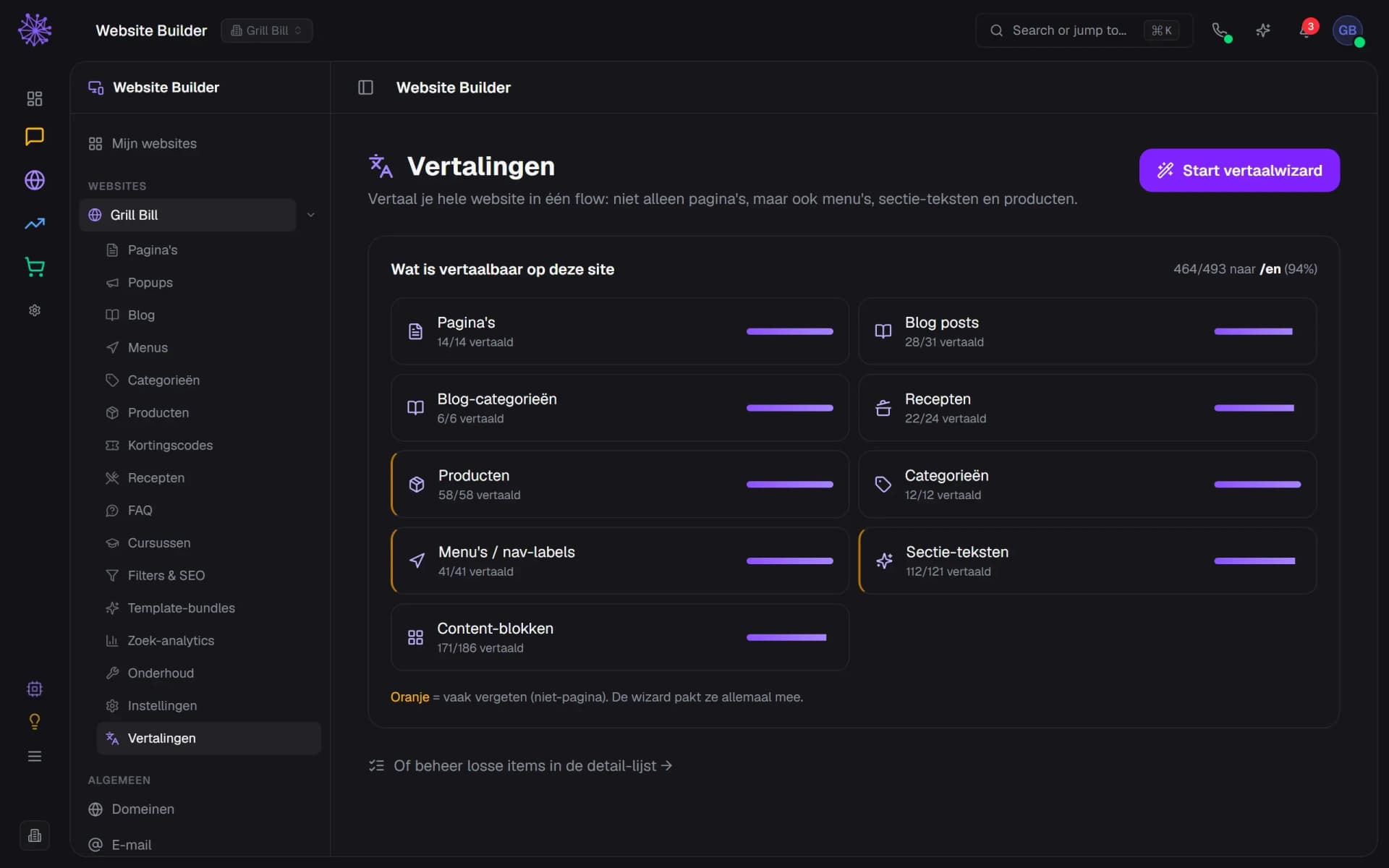
Per item type you see how much is translated: pages, blog posts, recipes, products, categories, menus, section texts and content blocks. What people often forget is marked orange. That shows whether a language is really finished.
  1. Total translated into /en, as a percentage
  2. Orange marks what is often forgotten
  3. Text inside content blocks counts too
Translations overview of a site with the coverage per item type for English in the Neuramerce dashboard

Choose what gets translated

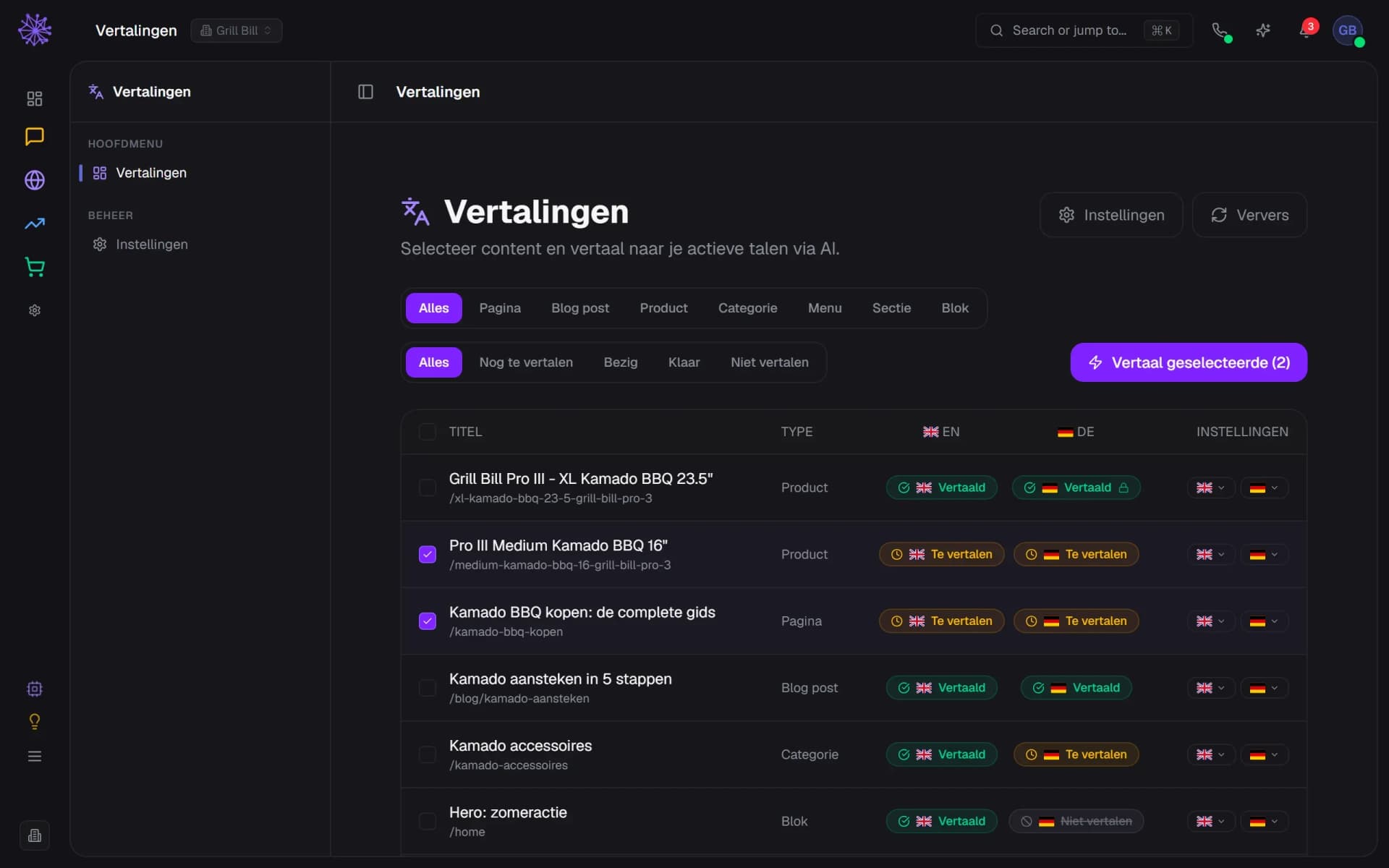
In the list you filter by type and status, tick items and have them translated with AI. The AI follows the tone of your Brand Kit and your glossary of brand names. Content that must stay in one language goes on Do not translate.
  1. Filter by status: to do, busy, done
  2. Translates only what you tick
  3. Locked: your own wording stays
List of products, pages and blog posts with the translation status per language and two ticked items

Edit per language

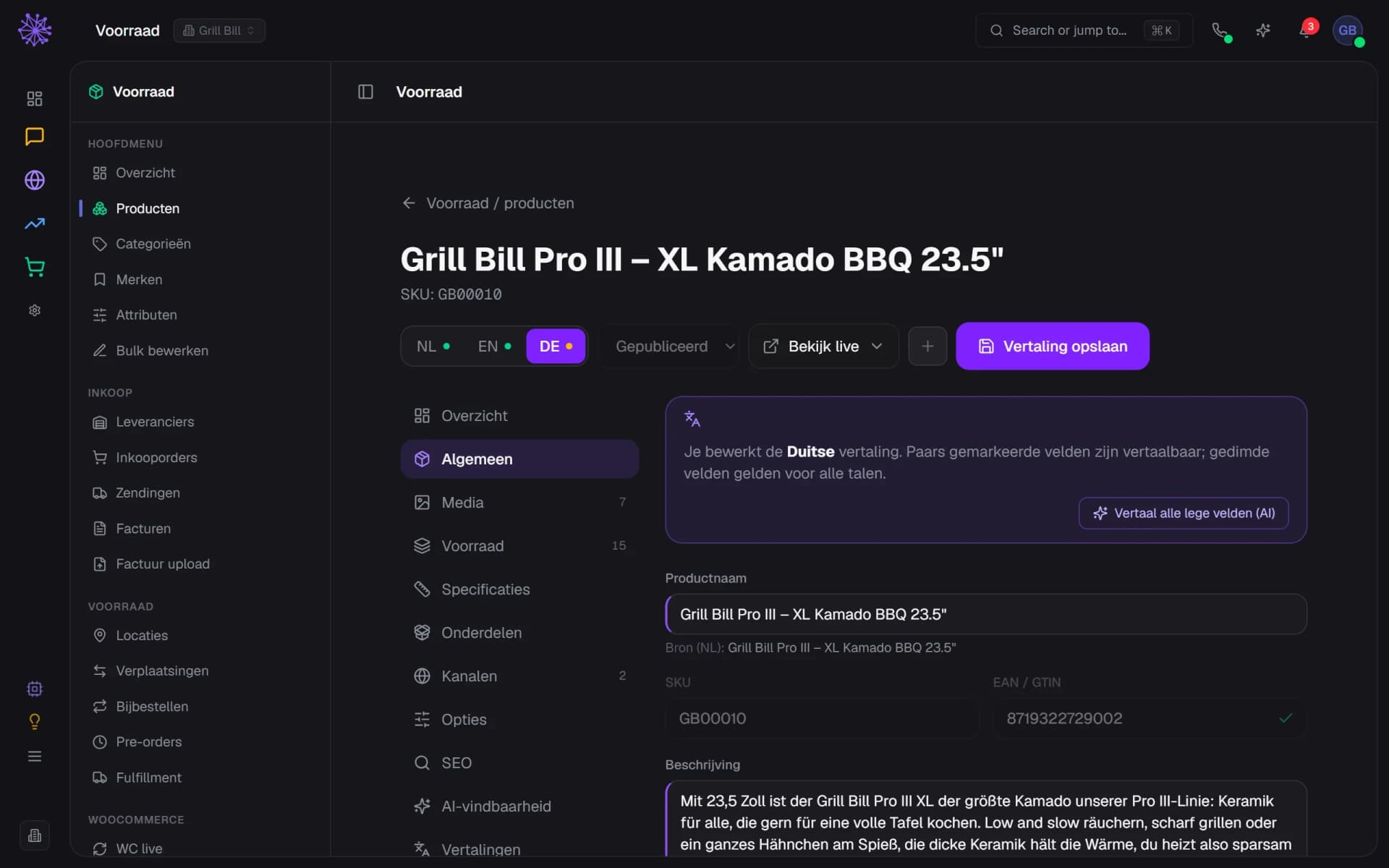
On a product you pick the language at the top. The fields become translation fields, with the Dutch source underneath. Type it yourself, or have the product translated with AI. For a product that includes the text in the blocks of the product page.
  1. Pick the language; the dot shows coverage
  2. Have this product translated with AI
  3. The Dutch source sits under every field
Product page of the Grill Bill Pro III XL in translation mode for German, with the Dutch source under the field

Check and lock

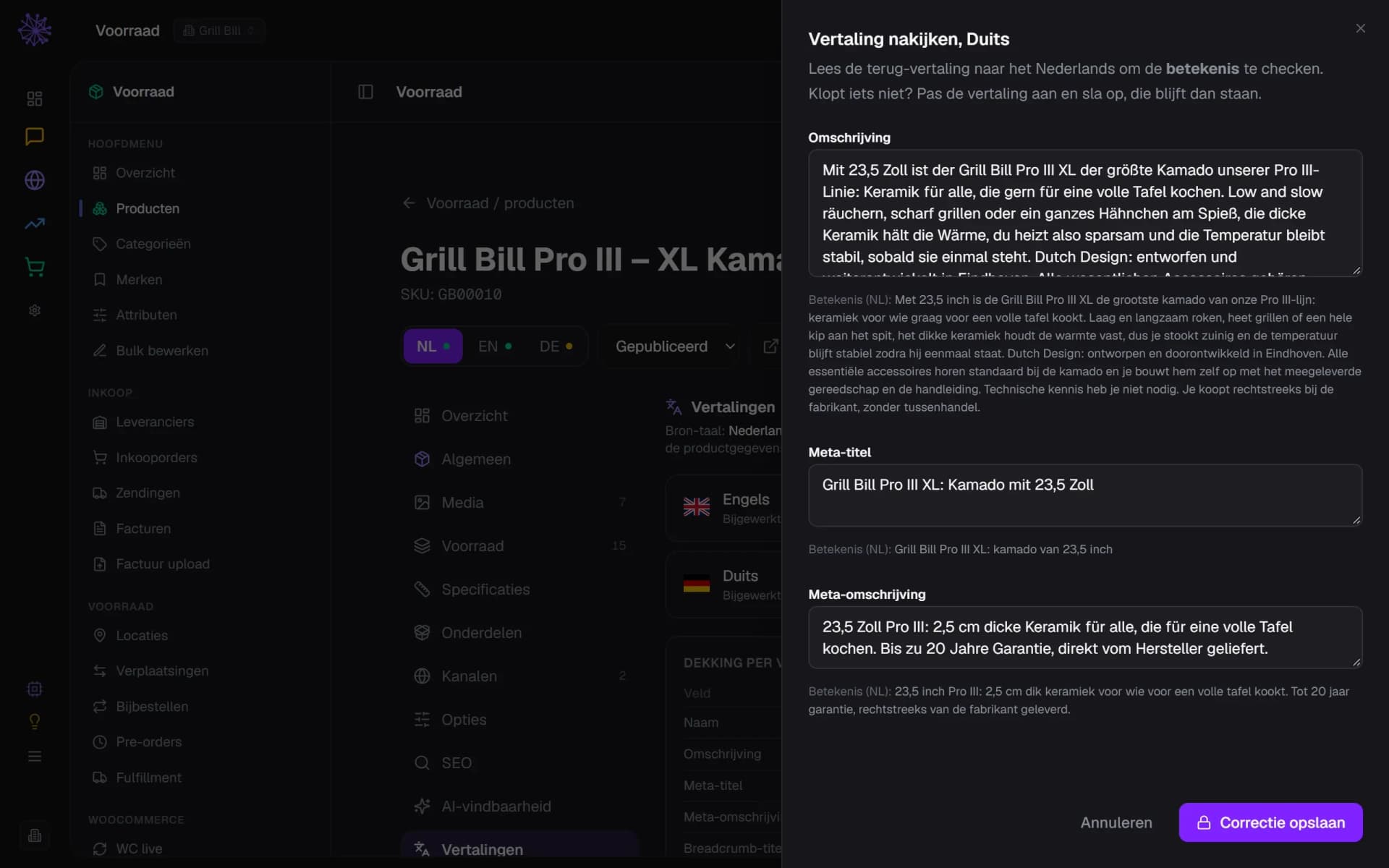
Open Check and you see the translation next to a literal back-translation into Dutch. Fix what is wrong and save. That text is locked, so a new AI run does not overwrite it. You can unlock it at any time.
  1. Edit the German text yourself
  2. Back-translation into Dutch to check the meaning
  3. Your correction is locked
Side panel Check translation with the German text and the back-translation into Dutch per field

What your visitor sees

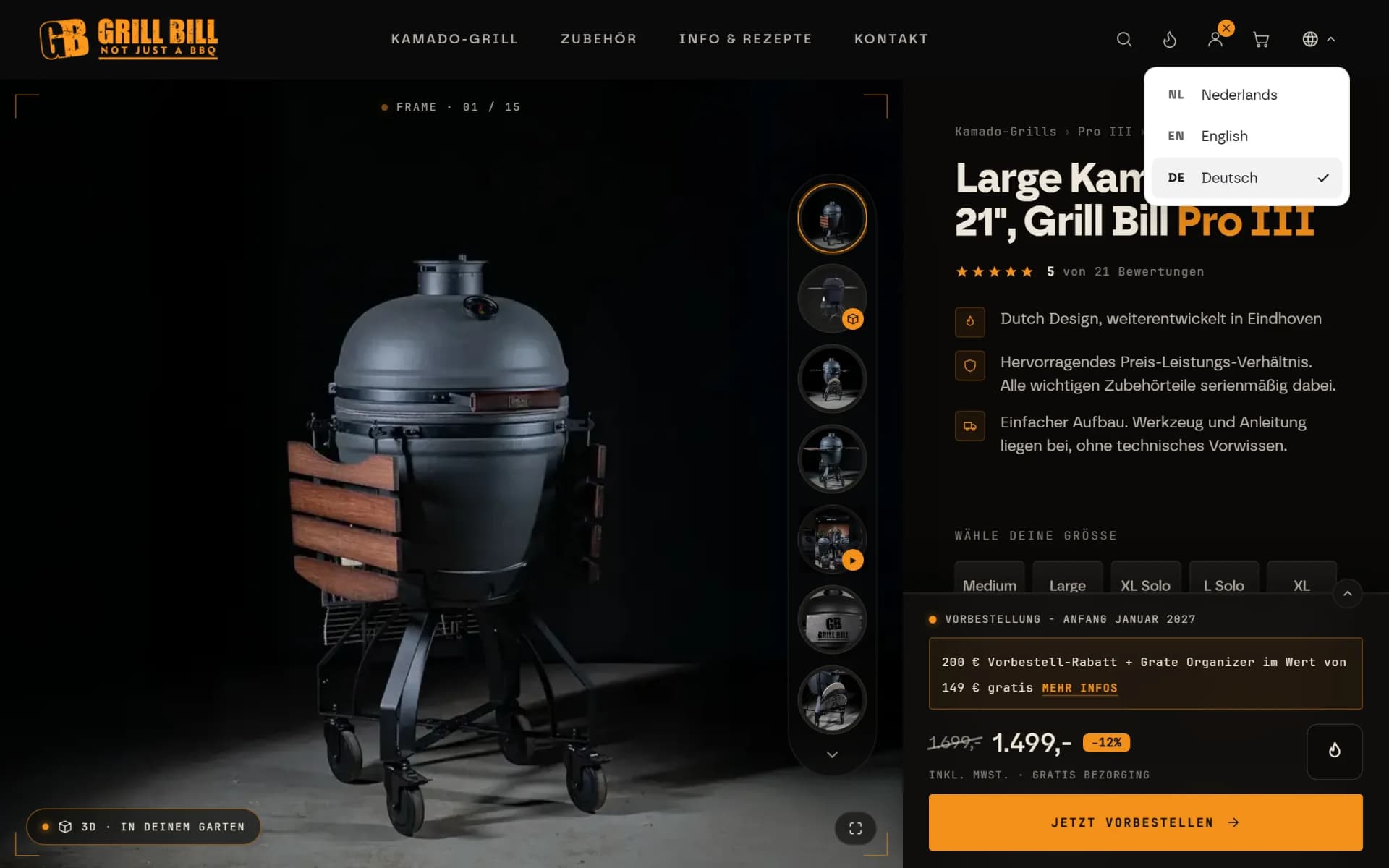
The page sits at its own address with its own title and description. A language switcher takes visitors to the same page in another language, and hreflang and the sitemap point the languages at each other. A bar suggests the browser language but redirects nobody.
  1. Language switcher: same page in NL, EN or DE
  2. Category and breadcrumb in German
  3. Product benefits in German
German product page of the Grill Bill Pro III on grillbill.eu with the language switcher open
app.neuramerce.com/modules/translations/settingsYour dashboard
Translations settings with the form to turn on German for Grill Bill, with URL prefix and market
Translations overview of a site with the coverage per item type for English in the Neuramerce dashboard
List of products, pages and blog posts with the translation status per language and two ticked items
Product page of the Grill Bill Pro III XL in translation mode for German, with the Dutch source under the field
Side panel Check translation with the German text and the back-translation into Dutch per field
German product page of the Grill Bill Pro III on grillbill.eu with the language switcher open
In practice

Three languages on grillbill.eu.

The product names, copy and screens above come from grillbill.eu. Grill Bill sells ceramic kamados in Dutch, English and German, each at its own address with its own titles for Google.

In mid-August 2026 Google left 298 pages of grillbill.eu out of its results: English and German pages still carried the Dutch title and description. A language is only finished once the title and description are translated too. The Grill Bill case explains how that was handled.

Multilingual carries through to the rest.

A standalone translation tool does not know your products, menus or SEO fields. This module lives in the same platform, so every language carries through to the rest.
  • Webshop. You translate product copy, categories and the text in the blocks of the product page in the same list. Order confirmations and shipping emails go out in the language of the order: Dutch, English or German.
  • Website Builder. Menus, section texts and content blocks are part of what you translate, and the site carries a language switcher.
  • SEO Manager. In a silo you see per language which address and title a page has, and where a language is still missing.
  • Inbox. If a customer writes in another language, you translate the message on request. That is a separate feature and uses the AI allowance of the inbox.
See it working in our own shops
FAQ

Frequently asked questions about translating a website.

No. The module translates the text of your own website or shop inside Neuramerce. No translators work for you. You have AI translate per item yourself or write the translation by hand, and you can have it back-translated into Dutch to check the meaning. If you need a certified translation, for terms and conditions for example, you arrange that yourself with a translator.
Only if the site runs on Neuramerce. The module works on sites and shops you have in Neuramerce, not on an arbitrary address. If your shop is on WordPress or WooCommerce now, we move products and content over first. After that you translate inside Neuramerce.
In the dashboard you choose from Dutch, English, German and French. You set the source language and turn on a language per site with its own URL prefix, such as /en or /de. The market is the country that language version is meant for. It sets the shipping zone for delivery time and whether hreflang carries a region: en-GB only if the market is GB.
No. Turning on a language only makes the address live and translates nothing. Whatever is not translated yet stays in the source language. You see per item what is missing and choose what to have translated. Nothing is translated in bulk or on publish. That is better for Google too: an English page with a Dutch title counts as a copy.
The AI is Claude from Anthropic. It follows the tone from your Brand Kit and your glossary, for example brand names that must never be translated. It remains a machine translation: read it, especially for product claims and legal text. You can edit any text yourself. An edited text is locked and a new AI run leaves it alone until you unlock it.
The module is part of every plan and turning on a language costs nothing. The app shows no rate per word or per language. AI translation does use the platform's AI capacity. For a large catalogue it makes sense to try one language and one item type first.
Every language version has its own address, its own title and description, hreflang with x-default and a self-referencing canonical. The sitemap lists the languages together. A language switcher takes visitors to the same page in another language. A bar suggests the browser language, but there is no automatic redirect. In the dashboard addresses get a language prefix (/en, /de) and the rest of the address stays the same. We do not promise a position in Google.
To the Claude API from Anthropic. It concerns the text of your site: products, pages, menus and blocks. So do not put customer personal data in texts you have translated. The back-translation under Check goes through that API too. Typing and saving a translation by hand does not use that API.

Want to see how your site looks in more languages?

In 20 minutes we show the module with your site as the example, from turning on a language to checking it.
See pricing